
Adobe integrates Acrobat with WhatsApp Web, Windows to simplify PDF editing and document sharing
ADVERTISEMENT
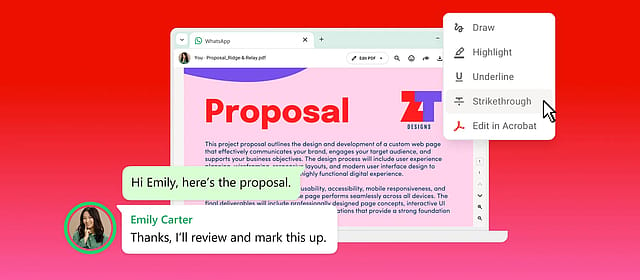
Adobe Inc. has announced the integration of its Acrobat PDF platform with WhatsApp Web and Windows, enabling users to view, annotate and edit PDF documents directly within their chats without leaving the messaging app. The move is aimed at simplifying document workflows as messaging platforms become increasingly central to business communication.
The new capability allows users to preview PDF files shared on WhatsApp, make basic edits such as highlighting, underlining and striking through text, and open password-protected documents within the chat interface. Those requiring more advanced editing can launch the file in Acrobat and share the updated version back into the same conversation.
Targets growing use of WhatsApp for work-related communication
Adobe said the integration is designed for users who frequently exchange contracts, invoices, proposals, reports and other business documents over WhatsApp. According to the company, documents retain their original formatting during editing and continue to be protected by WhatsApp's end-to-end encryption.
"Acrobat is built to power document workflows wherever they happen," Abhigyan Modi, Senior Vice President, Creativity & Productivity Business at Adobe, said while announcing the integration. He added that bringing Acrobat's PDF capabilities to WhatsApp allows users to work on documents within a platform they already use for day-to-day communication.
According to Adobe, users can also access Acrobat's broader feature set, including document organisation, e-signatures and password protection, from within the workflow. Subscribers to Acrobat's AI Assistant will additionally be able to generate document summaries, ask questions and extract key information from lengthy PDF files.
Part of Adobe's broader Acrobat expansion
The integration reflects Adobe's strategy of extending Acrobat beyond its standalone desktop application by embedding PDF tools into widely used collaboration platforms. Over the past few years, the company has added Acrobat integrations across several workplace and cloud ecosystems as enterprises increasingly look for ways to reduce friction in document sharing and approvals.
The latest rollout also highlights the growing role of WhatsApp in professional communication. While the Meta-owned messaging platform began as a consumer application, it is now widely used by small businesses, sales teams and enterprises for exchanging quotations, invoices, contracts and customer documents.
By enabling PDF editing within WhatsApp, Adobe is seeking to eliminate the need for users to switch between multiple applications, potentially making document review and collaboration faster for both businesses and individual users.